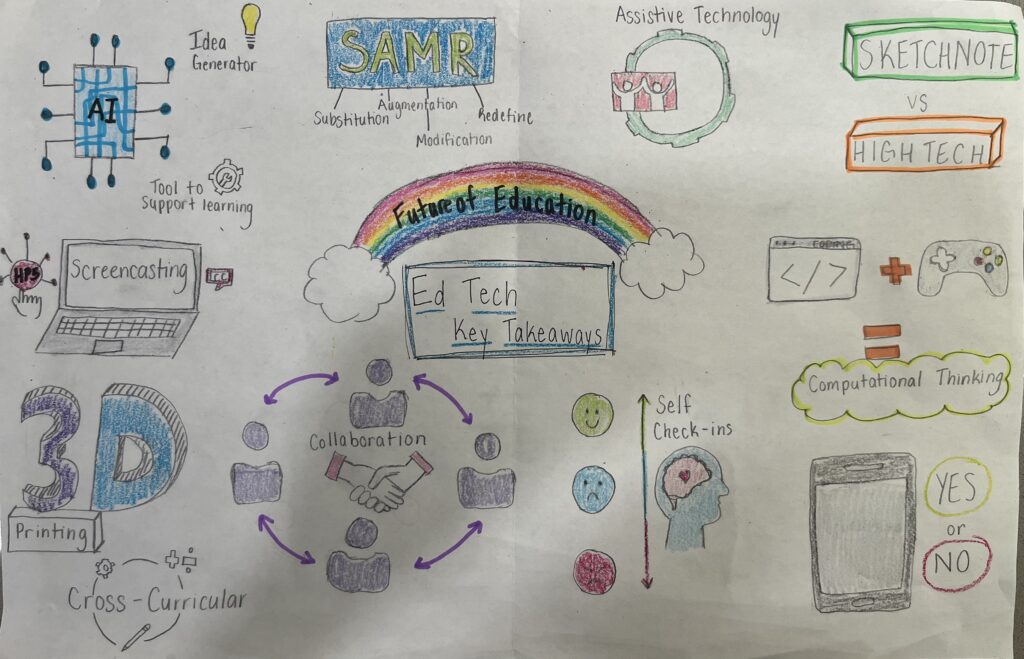
This term we have learnt about many different ways to incorporate technology into the classroom. In the picture below, I have used sketchnote to create a map of the topics and ideas that I believe are the most important and interesting.
Sketchnote created by Maya Parkins
The key takeaways I have sketchnoted
Generative AI as a tool to support learning and an idea generator
Screencasting and H5P to create accessible content
3D printing as a cross-curricular resource to teach your students in a creative way.
Collaboration between teachers and students to create an inclusive classroom.
Self check-ins and self-regulation to help students recognize their emotions and their needs to feel regulated.
Cellphones in the classroom: the pros and the cons.
The usefulness of coding and gaming to helo students develop computational thinking.
The differences between Sketchnoting and High tech medias and when to best use them.
Assistive technology and the importance to ensure it is integrated in the classroom to hlep students reach their full potential.
SAMR: Substitution, Augmentation, Modification, and Redefine
The use of cell phones and other personal devices in schools has been a largely discussed topic all over Canada. There are many pros and cons in the argument of if phones should be allowed in classrooms. The video below was a group project some classmates and I created about phones in schools. It explains the policies and the pros and cons, among other things, in regards to phones and other personal communication devices in school.
In the future, I would like to teach grade 4; therefore, I am going to assume that some of my students will have phones or some sort of personal communication device. Their digital literacy will be advanced enough that they would be able to navigate using phones and tablets in the classroom for educational purposes, with support and aid from myself.
I believe that the use of phones and tablets in my classroom for this age group would be useful to help the students to gain more independence in the learning. From researching different topics, conducting assignments and using sites to reflect their learning in different ways, it would help enrich my classroom and provide a UDL approach to the learning. However, if my classroom did not have access to tablets, it would be much more difficult to use technology in my classroom. Because they are still young, there is a high possibility that some of them do not have phone or are not allowed to bring them to school. Therefore, I would have to check to see who has access to phones before creating a lesson which requires them.
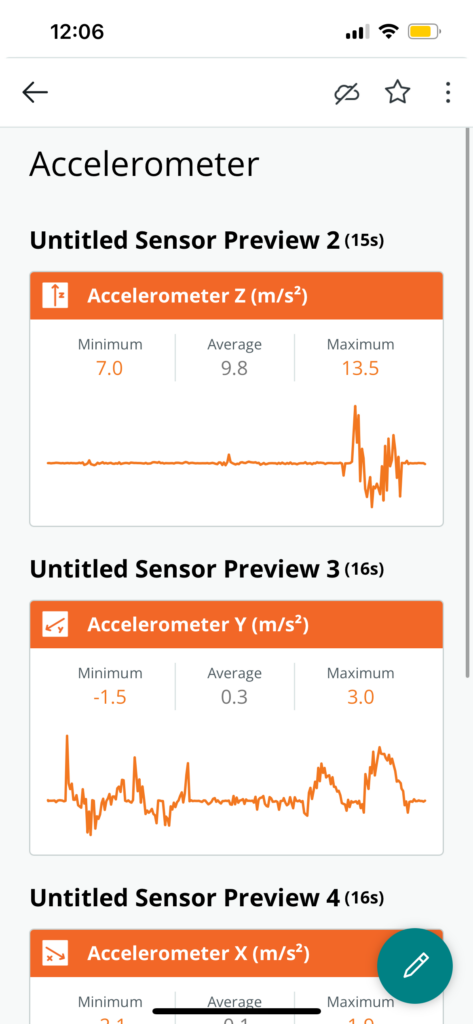
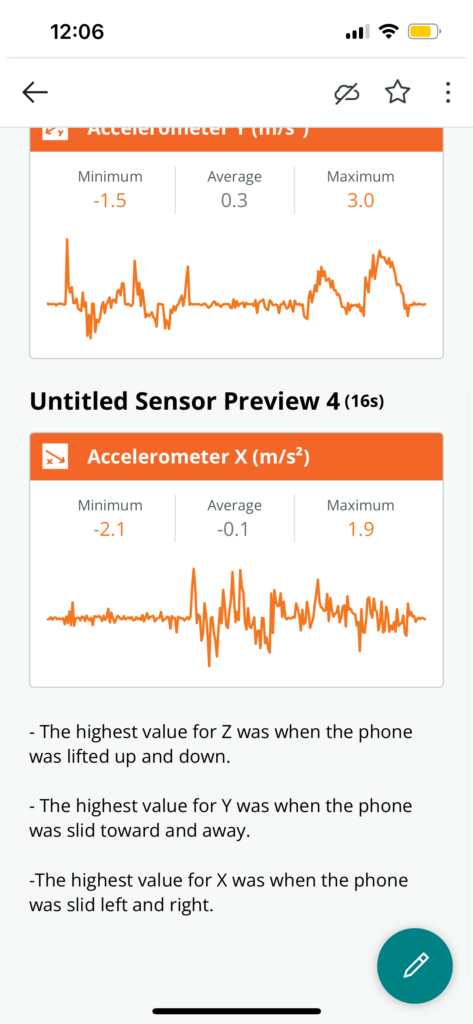
A great academic app that we tried out in class called Arduino Science Journal. This is a great way to help kids understand difficult scientific content such as acceleration. Below is the acceleration experiment I conducted using the app on my phone. It was really interesting to see how different movement was represented on a graph. I would definitely use this app with my class in the future. It was easy to navigate and fun to use!
In today’s Technology and Innovation class we had a guest speaker, Brittany Johnson, discussed how she manages her kindergarten classroom and create a collaborative learning environment to help her students thrive. This presentation was one that I found really resonated with me. Her focus on not only the collaboration with her student is something that I would love to bring into my classroom in the future.
To start her students day, she has the children place their hands on a ‘How are you feeling’ chart as they walk through the door to help her understand her students emotions starting the day. This is an amazing way to not only help Brittany navigate the day while being mindful of how her students are feeling that day, but also it is a great way for students to begin to recognize their own emotions. I believe that emotional literacy is a skill that should be taught at a young age, and this approach is a great way for students to begin their own inquiry into gaining emotional literacy.
Collaboration in building a classroom is another great way Brittany displays classroom management by ensuring that her students feel a sense of ownership in their learning environment. At the beginning of the school year, Brittany’s classroom is an empty canvas to be designed in tandem with her students. They work together to create the Alphabet and other academic displays. By having her students help her create the classroom displays, she is creating an environment where the students can take pride in their classroom and the learning taking place. This is a lovely way to manage the classroom becuase the students will want to respect the space they have created and will be more passionate about their learning. It would be amazing to see if there are other teachers who also create their classroom in a collaborative way and if they see a change in student engagement compared to when the teacher creates all the displays.
Problem solving is one of the most vital skills a student can learn in school. Without learning how to solve problems that arise in their lives and adapt, students will struggle to cope with the constant changes and road blocks life throws at them.
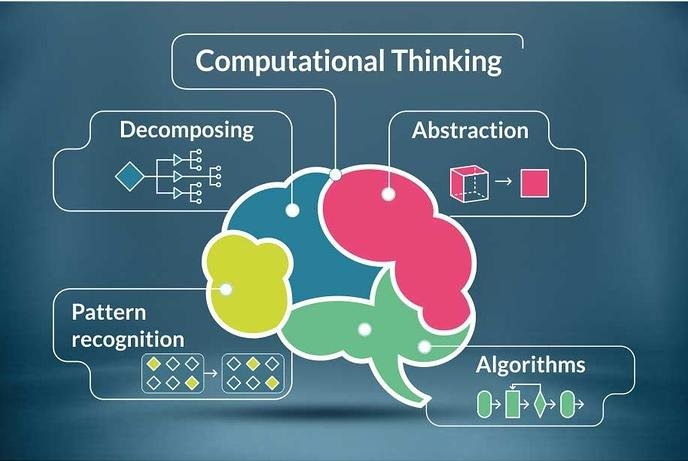
This is why learning computation thinking is so important. Being able to take a problem that can seem very large and unsolvable and breaking it down into manageable parts can help reduce the overwhelming feeling that comes with problems. Also, by breaking down the problem, you can start to discover patterns or similar problems that you have faced in the past. The decomposition of a problem also helps you recognize what is important to focus on and what needs to be fixed. This is a skill that can be used in an academic setting and in with real world problems.
Coding in a great way to help students understand computational thinking in a fun and creative way. Using a website called Code, teachers can have their students great a game by following easy steps. However, if there is a problem with the code or a student forgets a portion of it, then the students will need to problem solve to figure out what went wrong.
Another great way integrating coding and computational thinking into the classroom is by having your students create a step by step plan on how to make a peanut butter and jelly sandwichin their Science class and have the teacher follow the exact steps to show the importance of including every detail. However, I wonder how a teacher may do this while being mindful of the limited class time. Learning this is a great lesson for the start of a Science class to show how if the instruction for a task or experiment is not detailed enough, it could go in a very different direction.
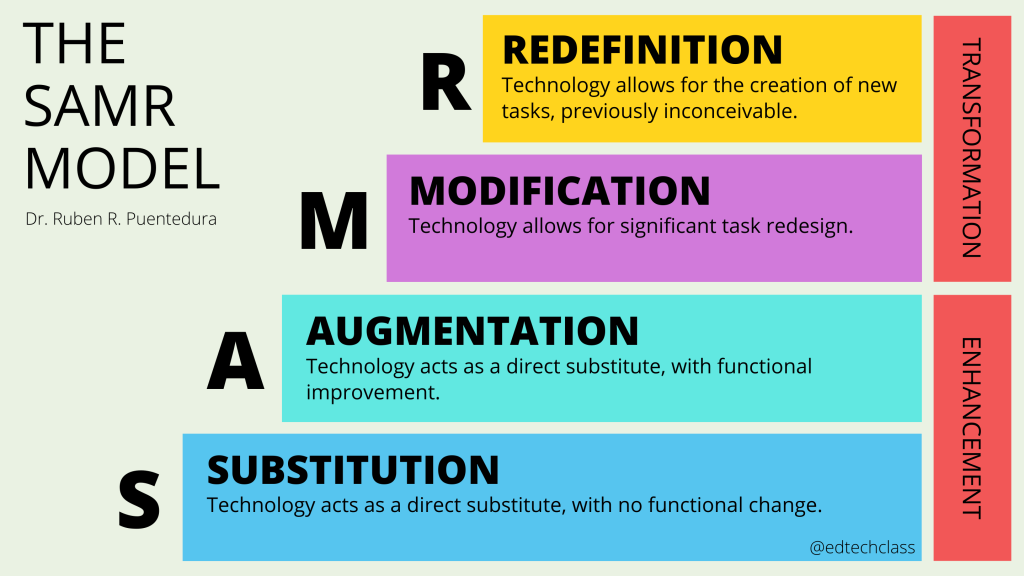
When looking to bring new technologies into the classroom, it is important to think about if the technology will enhance your students learning. By using the SAMR theory, which stands for Substitution, Augmentation, Modification, and Redefinition, you can better evaluate if a new technology is the right fit for your classroom. If the technology that you are planning to bring to the classroom is replacing another media without any task redesign, it may not be the most useful. Ideally, when bringing new tech into the class, the media should allow for the students to expand and express their learning in new creative ways. However, this does not mean that replacing a pen and paper with a computer to write an essay is not beneficial. It is a useful tool to help students who struggle with hand written work. It just means that when introducing new tech, it is important for it to open opportunities for students to expand and create beyond what they first believed was achievable. I wonder perhaps, if using this model, some teachers out there may find some technologies in their classroom are not as supportive to enhancing their students learning as they thought.
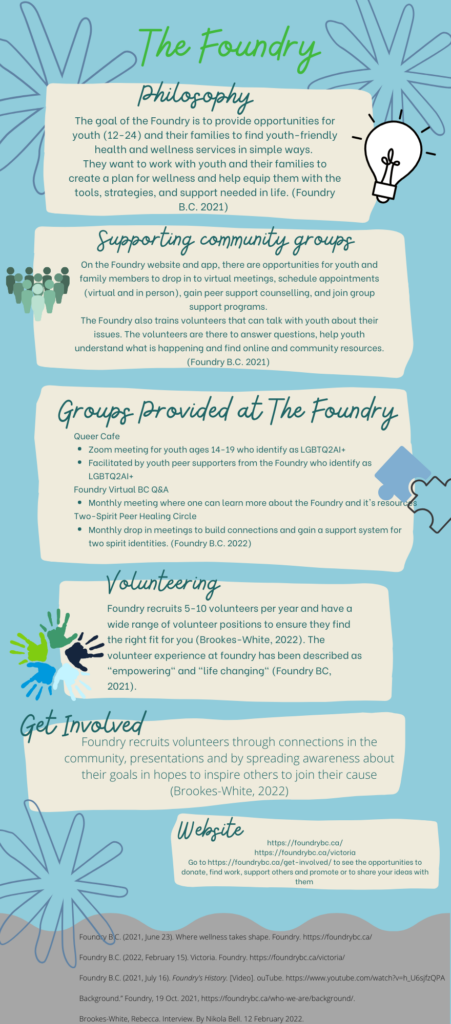
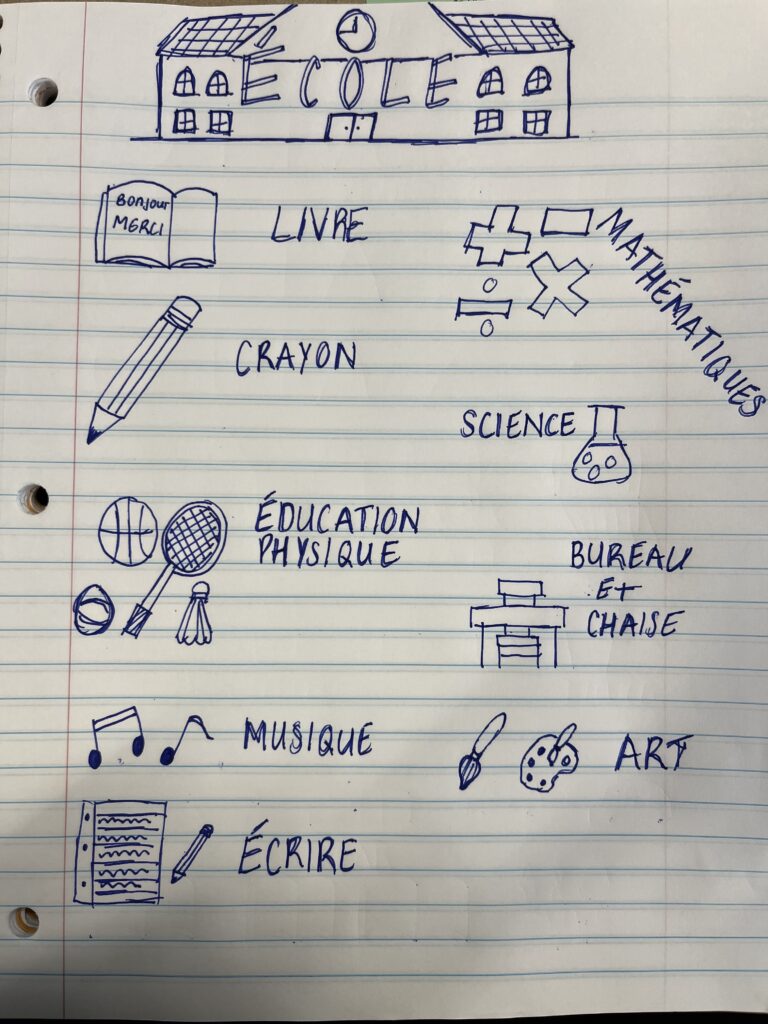
There are many different way to have student complete similar educational tasks and it is important to choose the right medium for your classroom. Today, we looked at Sketchnote, a low tech media, and Canva, a high tech media. We discussed the uses and what grades they would work best. I think that they are both great and useful in different ways. I feel that Sketchnoting is informal in comparison to Canva which is a formal and creative way to express information. You could use Sketchnoting in a younger grade level because it does not require your students to have a laptop, and Canva could be a difficult media to teach to younger students. For older grade levels, you could have them use Sketchnoting to plan out an infographic and then create the final copy using Canva. Therefore, I feel that Sketchnoting could be used in any grade level I end up teaching while Canva would be best be used in an older classroom where they have access to computers and their digital literacy is greater.
Here is an example of an infographic created on Canva and Sketchnoting:
When creating digital content for students or the general population, it is important, sometime even the law, to ensure that it is accessible to everyone. There are many way in which you can alter your digital content to be accessible to those around you.
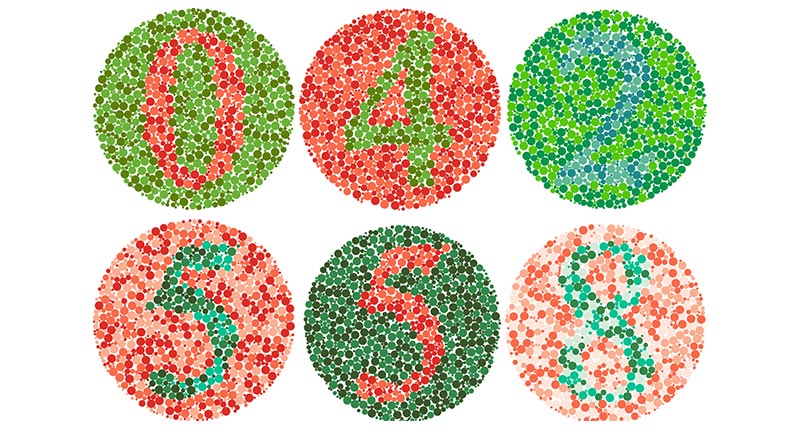
One of the easiest ways to ensure that your content is accessible, and one that I feel is overlooked, by ensuring that you are using colours that everyone will be able to perceive. I feel that many people forget that while content should look aesthetically pleasing to the eye, it is also important to create something that everyone can see with little strain to their eyes. If you are creating a website, you can check you site using a colour contrast checker. In the classroom that I work in on Wednesdays, there is a student who is red-green colour blind. Meaning that when he looks at the picture below, he cannot read the numbers in the coloured circle.
To help him and others who are colour blind or struggle to see colours, it is important to use colours and fonts with high contrast. If I decided to change my text colour to a grey, it would be very difficult to read because there would be very little contrast between the background and the text. So making sure that you are using forms of media that have large colour contrast will help the people viewing your work. Learning different ways to accommodate colour blindness in the classroom, both using media and in everyday tasks, is something that I would love to talk to other teachers about.
Another way to help create an assessable form of media is to have photos with alternative text. This means that along with the visual photo, there is a text description that will be read aloud by a screen reader if someone who is visually impaired is listening to the media you have created instead of reading it. Also, this is a useful tool for when the photo cannot load because the alternative text will appear when the photo is not visible. This is something that I did not know was a possibility, and I will start using alt-text more often.
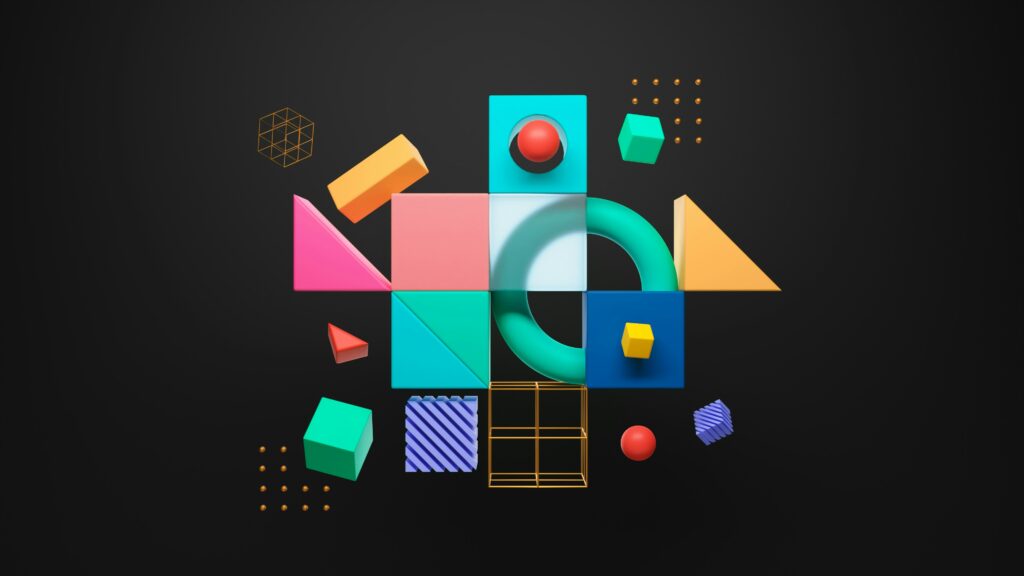
Example of an accessible photo
By Maya Parkins
One of the most important things to do when creating accessible content is to ensure that there are different ways students can view video footage. Making sure that there is video and audio when using a YouTube video or another site ensures that the content is accessible to everyone. Putting the subtitles option for students who are hard of hearing, are not able to listen to the video, or who do not speak English as their fist language, will allow them to still enjoy the content. I know that I appreciate having subtitles when watching a video to help me focus and absorb what is being said.
When thinking of learning opportunities for Elementary and Middle School students, 3D design and printing is not something that is commonly brought up. However, even if you cannot gain access to a 3D printer, getting your students used to 3D design at a young age would be a vital skill for them to learn for the future. Integrating 3D design into your teaching would help students to cultivate their creative minds and enhance their computer literacy skills. When teaching geometry, or even simple shapes, to learners, teachers can bring in 3D Design to help students understand different shapes and dimensions in a fun and creative way.
When learning about 3D shapes, many students, including myself, struggle with wrapping their brains around the concept. While you could get a box of 3D shapes out for students to play around with when they are learning about 3D shapes and structures, this is a difficult medium to expand when students require more practice to gain a full understanding of the topic and how they create the structures all around us. You could have the students use Tinker to explore different 3D shapes and see what creations they can create. For older students, you could ask them to create a table, or another object in the classroom, using only the shapes available in Tinker. This would have students work on how they would use the 3D shapes to create everyday objects.
While implementing 3D design and printing in the classroom is a great way to help your students understand, using Tinker is a difficult program to learn for younger students and therefore, it would take time and patience to help the students in feeling confident in using the site. The design that I made in our class time took a long time to properly organize after taking time to understand how Tinker worked. Also, because many schools do not have access to a 3D printer, it may not make sense to have students create a 3D design if their designs cannot come to life. If this method would not work in your classroom, perhaps having students create something in Minecraft or another similar site could work well to support their understanding of the 3D concepts they are learning about. However, I wonder if monitoring their use of these sites may be difficult in a classroom setting. It would be interesting to know if teachers have used Minecraft or another site in their classrooms.
Generative AI is something that I had very little knowledge about. I have hear about AI in the news and the worries that surround the topic; however, I have never actually attempted to use Gen AI. Now that I have had the opportunity to experiment with AI myself, I have discovered a fascination for it and all it is able to accomplish. However, now that I have learnt what AI is and what it is capable of, I have come to understand that my assumptions of what Artificial Intelligence is as a whole was incorrect.
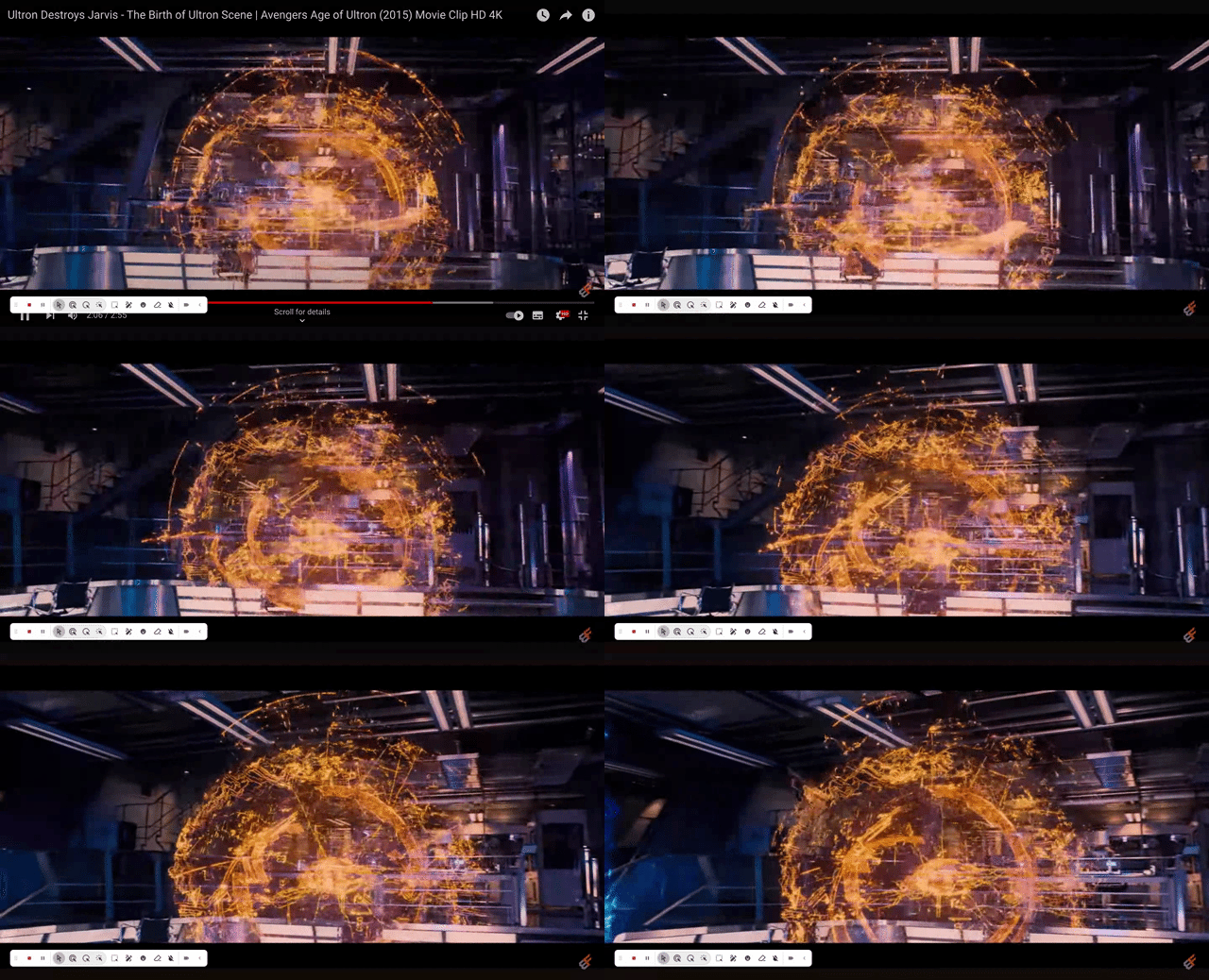
When I thought of AI, the first thing that always came to mind was a character from the Marvel Cinematic Universe known was J.A.R.V.I.S. J.A.R.V.I.S was an AI created to help Tony Stark run his company and to aid him in solving complex scientific and mathematical problems who was made to seem as if he was a sentient computer. Because of this portrayal of AI, I believed that Artificial Intelligence meant a fully sentient computer at your disposal to use.
This is not the case. Gen AI pulls from data which already exists from the internet and therefore cannot be sentient. This is one of the major limitations of Generative AI. While there is a plethora of information available on the internet, a lot of the data and knowledge is from a Western White perspective.
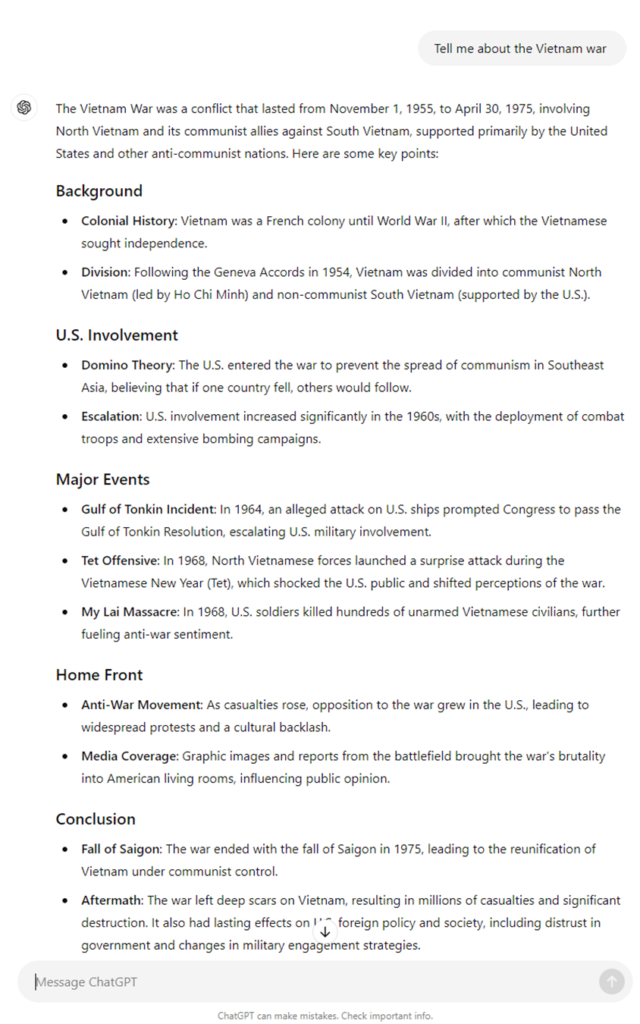
When I asked ChatGPT to ‘tell me about the Vietnam war’, they provided a brief summary of the conflict and then provided some of the key points of the war. While all the information collected is correct, it is from the United States perspective. Yet, if you look back at my question, I did not ask for the American experience of the Vietnam war. This is an example of how Gen AI biased in the information gathering and in the responses. To help fix this, you would need to phrase the question with more detail to ensure that you are gaining the results through a less biased lens.
If you are planning on having your students use Generative AI in your classroom, it is important that the students understand how to properly phrase their questions and that they ensure that they are not taking the information they gained as facts. After they have learnt how to properly use AI to support their learning and work, Gen AI would be a useful tool to implement regularly in the classroom.
One of the ways that I feel would be the best use of AI in the classroom is to aid students in discovering ideas for assignments and their writing. When provided with a set of criteria and a general prompt, many student struggle to create tangible ideas for them to write about. If students are allowed to use AI in the classroom, they would be able to generate an idea quicker and therefore would be able to spend more time on the actual writing assignment. I would be very interested to see how teachers are utilizing AI in their classrooms and if they find it a useful tool or if it is something that hinders their students creative minds
Multi-Media Learning Theory is something that can and should be used in all classrooms. I believe that by bringing in many different types of learning, it can better help student pick up and engage in their learning. Instead of standing in front of the class and lecturing about a specific topic, which many students would tune out and not pay attention to, using visuals, either photos, videos, or text can help the students to stay focused on what they are learning. However, it is important to not overwhelm student with too many different forms of media. I am hoping to teach grades 3 and 4 in the future, and I feel that introducing the Multi-Media tool H5P would be useful to have them interact with videos. However, getting students of this age range to attempt to use Screencast and H5P could become tricky. Because of the different levels of technological literacy these students may have, there could be large gaps in skill level. Therefore, if I decided to introduce these tools to my students for their own use, there would have to be many lessons leading up to this to help build their technological building blocks. However, I’m sure that a teacher of students in Middle and High School would benefit for their students using these tools on projects as another way to express their learning and interact with the teacher and other students.
Because we are in the age of emerging technology, there is a constant flow of new websites and ways that students can learn. However, not all students are able to quickly pick up new technological skill which can help their learning. Therefore, the use of Screencast can help students see a step by step process on how to navigate a new medium. Also, because Screencast has an interactive option, it allows educators to see if their students are engaging with the video and are paying attention to what is being shown on the screen. You can use Screencast to record anything on your screen and therefore, it is an extremely useful website to have. As see in my Screencast video below, I made a tutorial on how to make a Pinterest Board. While this video does not require any interaction with whomever is watching, I did add in some questions to see in the viewers were paying attention. Also, you are able to add links to the videos. This can be extremely useful for if you are needing students to go and try out what they have learned on the same website that you are working.
The Multi-Media Learning Theory provides educators with tools they can use to help their students engage in their learning both inside and outside the classroom. However, using too many of the tool at once can overwhelm the students short-term memory. Also, it is important to ensure that the medias that are being used align with what is being taught. If there are pictures on a powerpoint that do not correspond with what is being taught, it can cause students to become distracted. Therefore, when using different medias in the classroom it is important to ensure that you are enhancing your students learning instead of hindering it.
When I think about our current education system, the first thing that comes to mind is the emphasis on fact collection and regurgitation. In schools today, the focus is mainly on getting students to remember dates and facts when in reality the focus needs to be shifted more towards comprehension and inquiry. To reimagine our education system is to shift the focus less on grades and tests and more towards creating an environment that supports curiosity, provides skills needed to succeed, and nurtures our natural thirst for knowledge. In the film ‘Most Likely to Succeed,’ the school High Tech High allows for students to take control of their own learning in the classroom. Instead of sitting in a classroom listening to a teacher rattle off information needed to pass a test, the student are given a topic for the year and work together with their teacher and their peers to produce a final project for their end of year exhibition. This approach allows students to dive deeper and gain a much greater understanding of their given topic while also helping them gain the soft skills, such as how to work as a team, that help one succeed in the work place. If you compare this to a public school classroom, there is much less freedom and time to allow students to truly understand the concept they are learning. Therefore, resulting in less retention and passion of their learning. Also, by working in a typical classroom block subject setting, students do not learn the soft skills and some can struggle to understand how to work through complex tasks which span many different subjects.
In order to reimagine education there would need to be a large shift in everyones educational expectations. When I think of a successful school, classroom, and student, I imagine a plethora of books, hours of homework and teachers lecturing while their students take diligent notes. I’m sure that I am not the only one to picture this when thinking of how to be successful in school. This mindset is what I believe to be the biggest obstacle educators face when trying to change pedagogy. It it difficult to understand that without the books, homework and block classes students can learn what is needed to get into University, which is the goal many parent have for their children. I feel that parents would expect to see proof that a reimagined approach to education will allow their children to be successful in their professional lives. However, as see in ‘Most Likely to Succeed,’ because their new way of teaching has not been around long enough to provide substantial evidence of longtime achievement, they struggled to believe that going to High Tech High was the right choice for their child. Therefore, I believe that the largest obstacle that educators face when trying to change pedagogy is the shift in mindset towards more inquiry based learning and exhibitions. Understanding that receiving a good grade on a test or assignment does not necessarily mean a comprehension of the knowledge.
The approach see in this film is something that both excites and concerns me. Seeing that education is hopefully moving away from tests and subject divided classes and more towards inquiry based learning in the age where knowledge is readily available online makes me excited to become a teacher and to teach the next generation of students how to navigate the world and to cultivate an environment where their natural curiousness can flourish. However, in regards to an elementary school classroom, I wonder how reimagining education would work. I believe that it is important to ensure that young children have the building blocks, in all subjects, before they can set off and become more independent in their learning. Therefore, providing an environment where young students are able to gain the simple knowledge while still being able to independently dive deeper into the topic they are learning could be a difficult task. However, I do believe it is possible Their inquiry based learning would just have to be in a smaller scale. For instance, if we are learning about the life cycle of a butterfly, there could be multiple stations laid out with different activities to explain the life cycle with books to support the topic and go more in depth into the topic of life cycles in general. This approach would work for younger students, yet, when students get older and start to use computers, it would become extremely important for them to be taught how to stay safe online. While the internet is an amazing resource, it can also be somewhere someone can become misinformed or can get themselves into an unsafe situation. Therefore, if this is the direction that education is headed, I believe that internet safety and literacy is something that need to be taught at a young age. While there are many things about this educational approach that could see daunting, I feel that it is a great reinvention of the system and something similar should to brought to classrooms in Canada.